
I built a personal finance app with a local AI model
Disclaimer: This is a story about building a Local Finance app using a local AI model. We don't endorse any models, and this is not professional financial advice.
What happened
I have always wanted a local, zero-cloud access personal finance app that could help me understand my accounts, investments, tax documents, spending, and market news without sending all of that information to a cloud AI service. In the past I have subscribed to apps like Mint and CreditKarma but have considered those to be a security risk, not to mention the fact that they pedal their own products while leveraging your data to do so. With the advent of powerful open source AI models like Qwen 3.6 and Gemma 4, I thought it was time to give it a shot.
The Local hardware setup
I already had a Windows PC with an NVIDIA RTX 3090 (this is a Goldilocks graphics card which can hold a decent AI model entirely in the VRAM), so I (read Claude Code Opus 5.5) built the application to run locally, using an encrypted database, and talking to the 35-billion-parameter Qwen3.6 model running on this GPU. The model can answer questions about my finances without my private data being sent to a hosted AI provider. You might think the most important part was the model - but the interesting part turned out not to be the model itself. It was everything around it. A useful finance app needs accounts, transactions, documents, news, search, memory, market data, and a way to ask questions in plain English. It also needs a clear boundary between the things that should stay private and the things that legitimately need internet access.
A simple dashboard
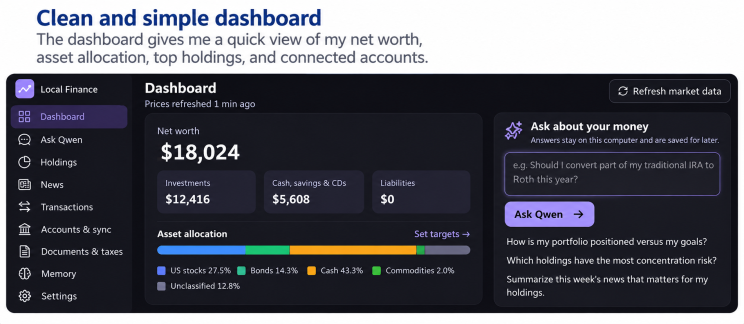
The main screen is a dashboard with a familiar layout: net worth, investments, cash, liabilities, asset allocation, top holdings, and connected accounts. There is also a box on the main screen where I can ask questions about my portfolio, concentration risks, news relevant to my holdings etc.
The AI model stays local, with controlled Internet access for real time data
The Qwen 3.6:35b model itself has no internet access. It runs locally on my GPU and can read information the app gives it, but it cannot independently send anything online. The main finance application is also isolated from the internet. A separate component handles approved online requests such as prices, market news, and brokerage synchronization. The app has a specific privacy setting for web research. I can choose between three modes: Automatic, Ask me first, Off. be sent online. That might include things like a full name, employer, or street address. For market data, I can mix my real ticker symbols with decoy tickers before sending a request. The external source sees ticker symbols and my IP address, but not my account balances, documents, or questions. So the architecture is intentionally split:
- The private side holds the database, documents, conversations, and local AI model.
- The online side retrieves things like prices, news, and brokerage data.
- The online component cannot read the private database.
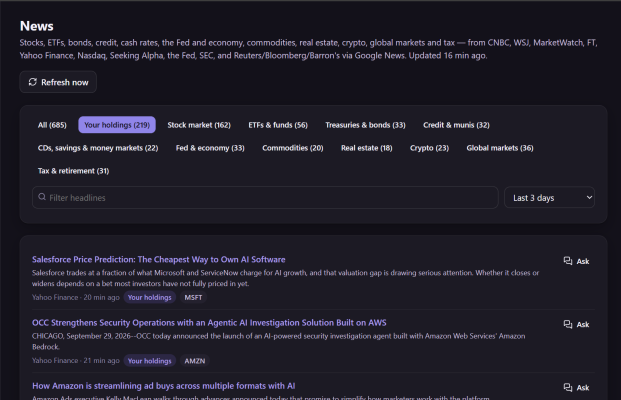
The news section collects broad market coverage across stocks, ETFs, bonds, credit, rates, the Federal Reserve, commodities, real estate, crypto, global markets, and tax topics. It also has a filter for my holdings, so I can quickly see which stories are relevant to companies or assets I actually own.
The assistant remembers previous conversations
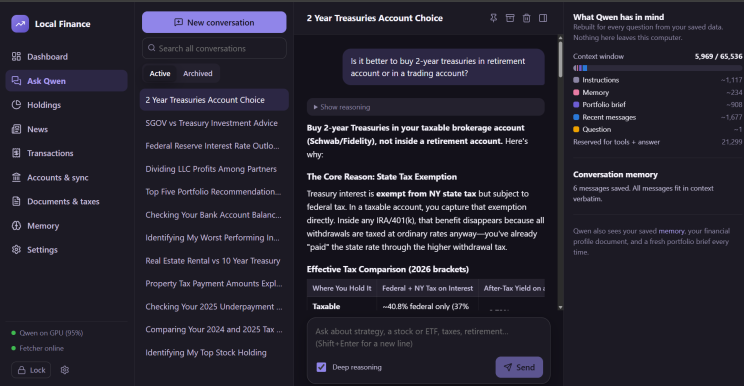
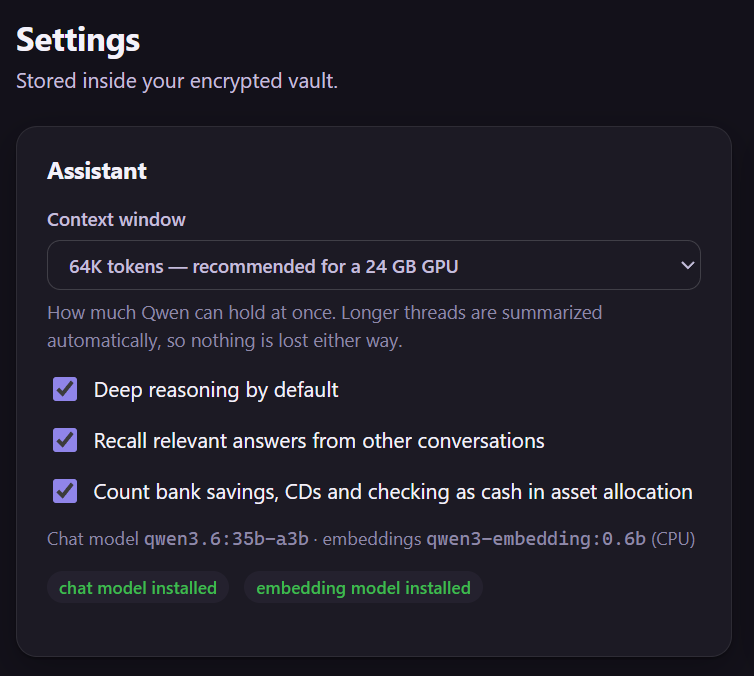
The “Ask Qwen” screen is built like a private financial analyst. It keeps separate conversations, lets me search previous threads, and can recall relevant information from earlier discussions. For example, I might have separate conversations about Treasury investments, Asset allocation, Federal Reserve policy, Tax questions, Real estate versus bonds etc. Each time I ask a question, the app rebuilds the context for the model. That can include my financial profile, important saved facts, a fresh portfolio summary, recent messages, and relevant information from previous conversations. The full history stays in the encrypted database. The settings screen lets me choose between a 32K, 64K, or 128K token context window. On my 24 GB GPU, 64K is the practical default. A larger context means the model can consider more information at once, but it also costs more memory and can slow things down. I also have settings for deeper reasoning, recalling relevant answers from other conversations, how cash accounts are classified, which models are used for chat and embeddings. The main model handles reasoning and conversation. A much smaller embedding model handles document search. That smaller model converts text into a searchable representation, which lets the app find relevant passages even if my wording does not exactly match the source document.
Getting the data in was harder than running the AI
The AI was the fun part. The data plumbing was a little bit tedious. Different financial institutions expose data in completely different ways. Schwab has a developer API. Fidelity does not offer the same kind of public retail API, so I use SnapTrade as an intermediary. Banks vary between OFX, QFX, CSV, and PDF statements and have no realtime APIs. Each format has its own problems. Broker APIs usually provide transaction IDs. CSV files usually do not, so the app creates its own fingerprints using things like account, date, amount, and description. PDF statements are harder. The app first tries normal parsing. If that fails, the local model can extract the data into a strict format.
🫤Dileep's Skeptical Takeaway
Running my financial AI locally gives me more control over sensitive data, but it also makes me responsible for performance, reliability, and maintenance. Ollama silently switched from the RTX 3090 to the CPU after the PC went to sleep, I added a watchdog to detect the slowdown and restart the service. On the GPU, the main model generates roughly 93–116 tokens per second, and typical finance questions finish in under a minute, though loading an idle model takes around 75 seconds. GPU memory is tight: the model uses about 22 GB of the available 24 GB, so the smaller embedding model runs on the CPU. Local AI is not automatically cheaper either - I already owned the hardware, but buying it specifically would mean accounting for electricity, storage, maintenance, and troubleshooting time. My main takeaway is that the model is only one part of a useful application, alongside databases, search, privacy controls, monitoring, and deterministic calculations.
Enjoying What the AI?
Get a new edition every week, plus join the conversation on LinkedIn.
Subscribe on LinkedIn